
My new remote ADS-B, AIS, SDR, Camera Server, setup...

Showing posts with label RTL-SDR. Show all posts
Showing posts with label RTL-SDR. Show all posts
Tuesday, August 17, 2021


Sunday, April 12, 2020
SDR Family...
SDR family on SV5BYR's shack is grow-up. Lot of tests, lot of improvments....Stay tuned.

Wednesday, April 8, 2020
RTL-SDR and preamplifier work....
Here it's the first block. A mini RTL-SDR (R-820T) into the same metal box with an 20db preamplifier. The preamp is powered from the same USB.
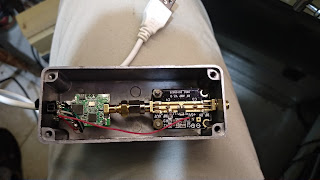
Here is the second combination. An RTL-SDR into the metal box and the preamplifier above...


Final setup. A blue thermal silicone it's under the RTL-SDR to spread the heat on metal box....


Here is the second combination. An RTL-SDR into the metal box and the preamplifier above...


Final setup. A blue thermal silicone it's under the RTL-SDR to spread the heat on metal box....


Wednesday, November 13, 2013
RTL-SDR HF server on-line...
After almost one and a half year of playing on RTL-SDRs dongles, I decide to purchase the Ham-It-Up upconverter to test it on HF too.... In 10 days my upconverter came from USA and I hook it up in 2 minutes. (Later on, I'll put it in a metal box together with RTL-SDR dongle as on picture)...

I get the newer version that use 125 MHz Local Oscilator and not 100 MHz to avoid the QRM from the Broadcast FM band. An old but good YAESU Low Pass HF Filter is added also between a disconne antenna and my upconverter. Actually Im using two dongles on my SDR Console Server. The "plain" one, covers the range from 24 MHz to 1.7 GHz and the new setup is dedicated for HF use only.
The first thing you have to do is to download the SDR Console V2 software. Click here. Then install the program and open it. You will see something like this:
.jpg)
.jpg)
.jpg)
.jpg)
.jpg)
I get the newer version that use 125 MHz Local Oscilator and not 100 MHz to avoid the QRM from the Broadcast FM band. An old but good YAESU Low Pass HF Filter is added also between a disconne antenna and my upconverter. Actually Im using two dongles on my SDR Console Server. The "plain" one, covers the range from 24 MHz to 1.7 GHz and the new setup is dedicated for HF use only.
The first thing you have to do is to download the SDR Console V2 software. Click here. Then install the program and open it. You will see something like this:
.jpg)
On the upper left corner hit "Connect" and a dialog box will shown. Put my data into the boxes as showned to the next picture:
.jpg)
Hit "Connect" and a new window will show you the to available options from the connected dongles to sever. If you choose the second option (EZcap USB) leave the box for the Upconverter blank.
.jpg)
If you wand to play with the Ham-It-Up HF Converter then on Converter box choose Manager. A new window will open and just put the data of LO 125.000 MHz in as shown on next picture:
.jpg)
Just check the Upconverter option and press the Add button. Now the LO frequency will be stored at upper box. Then OK to close the "Manager" window and go back to selection window. Choose 125.000 Up and now you can start tuning around. Is necessary to open the "FREQ / Mode / Filter" window that is on the middle of left side of your screen for frequency and mode input.
.jpg)
Try to get familiar with software if its your first time with that...
Enjoy your listening into ham bands and feel free to use it as long you want.
Subscribe to:
Posts (Atom)